
Usage
This document describes how to use jactionlint.
jactionlint command
With no argument, jactionlint finds all workflow files in the current repository and checks them. It checks the Dependabot configuration .github/dependabot.yml (or .github/dependabot.yaml) of the repository and its composite actions (action.yml in the root, under .github/actions, in any other directory of the repository, and the directories which a local uses: ./path refers to) as well.
jactionlintOnly the .yml and .yaml files directly in .github/workflows are workflows: GitHub does not load the files in its subdirectories (test data, prompts, tool configuration), so the repository mode does not check them. A file below .github/workflows/ which you give as an argument is checked anyway. The same goes for the globs of a hook such as the hk step: a ** glob would pass those files as arguments, so write .github/workflows/*.yml as in the examples.
When paths to YAML workflow files are given as arguments, jactionlint checks them.
jactionlint path/to/workflow1.yaml path/to/workflow2.yamlWhen - argument is given, jactionlint reads inputs from stdin and checks it as workflow source.
cat path/to/workflow.yaml | jactionlint -The Dependabot configuration is recognized by its path: a file named dependabot.yml or dependabot.yaml in a .github directory. Give it as an argument or use --stdin-filename to check it. Workflow rules are not applied to it. See the check of its syntax.
jactionlint .github/dependabot.yml
cat dependabot.yml | jactionlint --stdin-filename .github/dependabot.yml -
The metadata of an action is recognized by its name: a file named action.yml or action.yaml is an action anywhere except under .github/workflows. Give it as an argument (this is what the .github/actions/**/action.y*ml glob of hk does) or use --stdin-filename to check it. The steps of a composite action are checked with the rules for workflow steps, and the rules which depend on how the action is run use the local workflows that call it. Ignore comments, paths:, --format sarif and --fix work as for workflows. See composite actions.
jactionlint .github/actions/setup/action.yml
cat action.yml | jactionlint --stdin-filename action.yml -
Command line options
jactionlint --help prints the list below, and man jactionlint has the same in the manual. jactionlint uses POSIX/GNU options only:
--long-nameoptions are kebab-case and take a value as--format=jsonor--format json. A boolean option takes no value.- Short options are one letter, can be bundled and take a value attached or separate:
-vfjson,-cfile.yaml,-c file.yaml. Only the most used options have one; the rest are long only. --ends the options (jactionlint -- -odd.yaml). A lone-is not an option: it reads stdin.- An option with an optional value (
--fix,--color,--online,--baseline,--baseline-write) takes it only with=:--fix=unsafe,--online=cache.--fix unsafeis--fixplus a file namedunsafe. - A default that is on is turned off with
--no-X(--no-online,--no-baseline);--no-colorand--no-hintsalso exist. - Abbreviations (
--form) are not accepted. An unknown option or an invalid value exits with status 2 and a one-line message. - The single-dash long options of v1 are not accepted any more; the error names the replacement. See the migration table.
General
| Option | Short | Description |
|---|---|---|
--help | -h | Show this help and exit |
--version | -V | Show the version and how this binary was installed, then exit |
--verbose | -v | Print verbose logs to stderr |
--debug | Print debug logs to stderr (for development) | |
--stdin-filename=NAME | File name used in the output when reading stdin (default <stdin>) |
Output
| Option | Short | Description |
|---|---|---|
--format=FORMAT | -f | Output format: text (default), oneline, json, jsonl, sarif, gcc, github, summary, or a Go template containing {{ }} |
--oneline | One line per finding; same as --format oneline | |
--rule-ids | Accepted for compatibility. The text output always shows the rule ID at the end of each finding | |
--color[=WHEN] | Colorize the output: always, never or auto (default). Bare --color means always | |
--no-color | Same as --color=never | |
--no-hints | Do not print the hint line after a text run with many findings | |
--min-severity=LEVEL | Hide findings less severe than LEVEL: info (default), warn or error | |
--strict-exit | Exit with status 1 also for findings of level warn and info |
Rules and configuration
| Option | Short | Description |
|---|---|---|
--profile=NAME | -p | Rule profile: correctness, default or pedantic. Overrides "profile" of the config file |
--config-file=FILE | -c | Use this config file instead of .github/jactionlint.yaml |
--ignore=PATTERN | -i | Ignore findings whose rule ID or message matches PATTERN (a rule ID or a regular expression). Repeatable |
--init-config | Write a default config file .github/jactionlint.yaml and exit | |
--migrate-config | Rewrite the deprecated keys of the config file and exit | |
--migrate-ignores | Rewrite "# zizmor: ignore[...]" comments into "# jactionlint ignore=..." comments and exit |
Fixing
| Option | Short | Description |
|---|---|---|
--fix[=unsafe] | Apply the safe automatic fixes in place. --fix=unsafe also applies the fixes that may change behavior | |
--diff | Print what --fix would change as a unified diff and write nothing (implies --fix) | |
--fix-rules=RULES | With --fix or --diff: apply only the fixes of these comma separated rule IDs |
Baseline
| Option | Short | Description |
|---|---|---|
--baseline[=FILE] | Hide the findings recorded in the baseline (default .github/jactionlint-baseline.json). --baseline=FILE reads another file | |
--no-baseline | Ignore the baseline even when the config file enables it | |
--baseline-write[=FILE] | Record the current findings as the baseline and exit 0. --baseline-write=FILE writes another file | |
--baseline-check | Report baseline entries which match no finding any more (implies --baseline) | |
--sarif-hide-baselined | Leave baselined findings out of --format sarif instead of marking them suppressed |
GitHub API (online checks)
| Option | Short | Description |
|---|---|---|
--online[=MODE] | Run the checks which query the GitHub API. MODE: cache (cache only, no network), strict (fail when a lookup is skipped) or cache,strict. The environment variable JACTIONLINT_ONLINE sets the default | |
--no-online | Never use the network, even when the config file enables the online checks | |
--online-api-url=URL | REST API URL of a GitHub Enterprise Server, e.g. https://ghe.example.com/api/v3 | |
--online-token-env=NAME | Name of the environment variable that holds the GitHub token | |
--online-token-file=FILE | File that holds the GitHub token | |
--online-allow=PATTERN | Look up only repositories matching owner/repo PATTERN ("*" is a wildcard). Repeatable | |
--online-deny=PATTERN | Never look up repositories matching owner/repo PATTERN. Repeatable | |
--online-cache-ttl=DURATION | How long a cached GitHub answer is used without revalidation (default 1h; 0 always revalidates) | |
--online-max-wait=DURATION | The longest to wait for a GitHub rate limit to reset (default 30s; 0 never waits) |
External tools
| Option | Short | Description |
|---|---|---|
--shellcheck=CMD | Command or path of shellcheck (default shellcheck). Empty disables the integration | |
--pyflakes=CMD | Command or path of pyflakes (default pyflakes). Empty disables the integration |
Exit status: 0 no problem, 1 problems found, 2 invalid command line, 3 failure.
Choose a profile
jactionlint has three profiles, each including the one before it: correctness (what actionlint checks, plus the bug detectors of jactionlint), default (adds the security posture and policy rules; used when nothing is configured) and pedantic (adds the noisy and opinionated rules). Pick one in the config file, or on the command line, which wins:
jactionlint --profile correctness   # only mistakes, like actionlint
jactionlint --profile pedantic # everything# .github/jactionlint.yaml
profile: correctness
rules:
unpinned-uses: error # a rule of a higher profile on top of itThe old names strict and all are read as pedantic in the config file with a deprecation warning. See coming from actionlint for the checks of actionlint.
The first run
The default profile is strict on purpose, so most repositories fail it the first time (the median repository of the bug bash had about 60 findings, all of them errors). When a text run finds 20 or more findings (the default profile reports a median of 37 per repository on the corpus, so most first runs reach it and a repository which follows the checks does not), jactionlint prints one line to stderr that says what to do next and leads with --baseline-write, for example:
note: 132 findings in 14 files, which is a lot for a first run of the default profile. to adopt the checks without fixing everything first, record the findings with --baseline-write: later runs then fail only on new findings. see --format summary for the counts per rule; the name at the end of a finding is its rule ID, which --ignore, the config and ignore comments accept; for the checks of actionlint only use --profile correctness. silence this note with --no-hints or JACTIONLINT_NO_HINTS=1It is shown only when stderr is a terminal or the process runs in CI (CI or GITHUB_ACTIONS is set), never with --format json, sarif, summary, github, gcc or a template, never with --profile correctness (those findings are mistakes, not something to adopt), and not at all with --no-hints or JACTIONLINT_NO_HINTS=1. The advice to write a baseline is left out once a baseline is applied. After --baseline-write the command prints the line that makes plain runs use the baseline (baseline: auto in the config file); without it only jactionlint --baseline reads the file.
Ignore some errors
Every error has a stable rule ID such as unpinned-uses. The text output shows it at the end of each error (--rule-ids is accepted and does nothing), and the id field of --format json and the ruleId of --format sarif have it.
.github/workflows/ci.yaml:12:15: action "actions/checkout@v4" must be pinned to a full-length commit SHA ... [unpinned-uses]To ignore some errors, --ignore option filters errors by rule IDs or by messages using regular expression. A pattern which is exactly a rule ID ignores all the errors of the rule. Any other pattern is a regular expression matched to the error messages. The regular expression syntax is the same as RE2. The option is repeatable.
jactionlint --ignore template-injection --ignore 'label ".+" is unknown'The same patterns are available in the configuration file (paths.<glob>.ignore) and in ignore comments. Several patterns are separated with commas. There are two forms of an ignore comment, and each covers a precise range of lines.
A comment on its own line covers the next line which is not a comment nor blank, and the lines nested under it (comments and blank lines inside do not end the range). Several such comments can be stacked above the same line.
steps:
  # jactionlint ignore=template-injection,label ".+" is unknown
  - run: echo '${{ github.event.pull_request.title }}'
A comment at the end of a line covers that line and the lines nested under it. It can follow other comment text, so it can sit after the version comment of a pinned action:
steps:
  - uses: actions/checkout@v4 # jactionlint ignore=unpinned-uses
  - uses: actions/cache@0c45773b623bea8c8e75f6c82b208c3cf94ea4f9 # v4.0.2 # jactionlint ignore=forbidden-uses
In both forms, when the line it covers starts a sequence item (- ), the whole item is covered. A comment above a step, or at the end of the step's first line (- uses: ... or - name: ...), therefore covers the whole step, including its with: and env: but not the next step. The same comment on a key (build: # jactionlint ignore=...) covers the key and everything nested under it, for example a whole job. A # inside a quoted string or in a run: | script is not a comment and is never read as a directive.
Which form to use: an ignore comment is right next to the code it is about, but a tool that rewrites the line (Renovate, Dependabot bumping an action) drops the comment at the end of it. Put an ignore on a line that such tools manage in the config file instead, where it matches by rule, file, job, step and uses: and survives the rewrite: see durable ignores.
A comment which suppresses nothing is reported by the unused-ignore rule of the pedantic profile.
zizmor ignore comments
A repository which used zizmor keeps the findings it has already triaged: jactionlint honors # zizmor: ignore[rule-a,rule-b] comments for the rule IDs it shares with zizmor, with zizmor's rules.
steps:
  - uses: actions/checkout@v4 # zizmor: ignore[unpinned-uses] pinned by the mirror
  - run: | # zizmor: ignore[template-injection]
echo '${{ github.event.pull_request.title }}'- The comment must be a YAML comment spelled exactly
# zizmor: ignore[...](one space after#and after:). A reason may follow the closing bracket after white space. The comment may follow another comment (# v4.1.0 # zizmor: ignore[...]). - Several names are separated with commas. A name that jactionlint has no rule for (an audit it lacks) is skipped, not an error.
# zizmor: ignorewithout a rule list does nothing, as in zizmor. - Like in zizmor, the comment applies to the findings which have a location with the comment in it, and a finding of zizmor has more than the line it points at. A comment on any line of a step (
name:, a line of its own between two keys,env:) applies to thetemplate-injection,artipacked,unpinned-usesand other findings of the step. A comment on any line of a job applies to itssecrets-outside-envfinding. For a job that calls a reusable workflow, a comment on itsuses:orsecrets:applies tosecrets-inherit, and a comment anywhere inon:applies todangerous-triggers. A comment on the line which opens a value, such aspermissions:orrun: |, applies to everything inside that value. A comment on a line of its own above the first line of a step belongs to the step above, not to it. Text inside a block scalar or a quoted string is never a comment. - Audit names that differ from the jactionlint rule ID are mapped by a short table.
unused-ignoredoes not report zizmor comments, because zizmor may still run on the repository and decides what its comments suppress. Once zizmor is gone, turn on itszizmoroption to find the comments left over; then a comment is reported only when its audit maps to a rule that is enabled.
jactionlint --migrate-ignores [files] rewrites the trailing zizmor comments (of the workflows and the root action.yml of the project when no file is given) into # jactionlint ignore= comments on the line above and moves the reason to a plain comment line. A version after the comment on a uses: line (# zizmor: ignore[artipacked] v6) stays on that line as # v6. Names with no jactionlint counterpart stay in the zizmor comment, and running it again changes nothing. A comment which is not migrated is listed with the reason, for instance a comment on the first key of a step with more keys, where a comment above would cover the whole step.
--shellcheck and --pyflakes specifies file paths of executables. Setting empty string to them disables shellcheck and pyflakes rules. As a bonus, disabling them makes jactionlint much faster Since these external linter integrations spawn many processes.
jactionlint --shellcheck= --pyflakes=Format error messages
--format option selects the output format. The available formats are as follows.
| Format | Description |
|---|---|
text | The default. File path, position, message and kind followed by the source snippet and an indicator. --oneline or oneline omits the snippet. |
oneline | The same as text with one line per error. |
json | A JSON array of error objects. It is the same as --format '{{json .}}'. |
jsonl | One error object per line (JSON Lines). |
sarif | A SARIF 2.1.0 log with the rule metadata, levels, regions and fixes. Useful for code scanning and for tools like hk. |
gcc | file:line:col: severity: message [id] like GCC. severity is error, warning or note. |
github | Workflow commands (::error file=...,line=...,col=...,title=<id>::message) which GitHub shows as annotations. Use warning and notice for lower levels. |
summary | Counts instead of findings: how many per rule and per file, new ones and baselined ones apart. Useful in CI logs and to plan the adoption of a stricter configuration. |
Any other value which has {{ }} is a custom template in Go template syntax as explained below. The output of the structured formats goes to stdout and the logs (including the deprecation warnings of the configuration) go to stderr, so the output can be piped to other tools safely.
The text format of errors is the same as in the former versions. An error whose level is lowered to warn or info in the configuration has warning: or info: before the message. The rule ID, not the legacy kind, is at the end of the line.
An error object of json and jsonl has these fields.
| Field | Description |
|---|---|
message | Body of the error message |
filepath | Canonical relative file path. It may be omitted when the input is stdin |
line | Line number of the start of the error (1-based) |
column | Column number of the start of the error (1-based, counted in Unicode code points) |
end_line | Line number of the end of the region of the error |
end_column | Column of the last character of the indicator (legacy, counted in Unicode code points like column). SARIF has the exclusive end column of the region |
kind | The legacy group of the error such as expression |
id | The stable rule ID such as template-injection |
severity | error, warn or info |
doc_url | The URL of the documentation of the rule. It is omitted for custom rules |
snippet | Code snippet to indicate the position of the error |
fix | The automatic fix of the error: its description and the byte-range edits. It is omitted when there is no fix |
no_fix | Why a finding which the rule can fix has no fix: a code (option-required, option-invalid, online-required, lookup-failed, unsupported-shape or needs-judgment), a reason and, for the options, the option to configure such as missing-timeout.default-minutes. It is omitted when there is a fix and for findings which are advice only |
Lines and columns
Lines and columns are 1-based and columns count Unicode code points (a tab, an accented letter and an emoji are one column each; a CR before a LF is not counted), in every format: the SARIF log says columnKind: unicodeCodePoints. The region of a finding in the SARIF log (and the EndLine and EndColumn of an error) ends just after its last character.
A finding inside a string (an expression, a line of a run: script, a secret) is on the line and at the column of the text in the file, in every style of YAML scalar: plain, single quoted (''), double quoted (escapes such as \n, \", \x41, \u00e9 and \<newline>), literal blocks (|) and folded blocks (>), also over several lines. The text of a folded line break is at the end of its line. The region of a finding (end_column of json, the SARIF region) is the same in every format: the SARIF region ends just after the last character, and the end_column of json is the column of the last character of the ^~~~ indicator, which underlines the same region (it counts code points like column).
Before explaining the template details, let's see some examples.
Example: Serialized into JSON
jactionlint --format '{{json .}}'This is the same as jactionlint --format json.
Output:
[{"message":"unexpected key \"branch\" for ...Example: Markdown
jactionlint --format '{{range $err := .}}### Error at line {{$err.Line}}, col {{$err.Column}} of `{{$err.Filepath}}`\n\n{{$err.Message}}\n\n```\n{{$err.Snippet}}\n```\n\n{{end}}'Output:
### Error at line 21, col 20 of `test.yaml`

property "platform" is not defined in object type {os: string}

```
          key: ${{ matrix.platform }}-node-${{ hashFiles('**/package-lock.json') }}
                   ^~~~~~~~~~~~~~~
```
Example: Serialized in JSON Lines
jactionlint --format '{{range $err := .}}{{json $err}}{{end}}'Output:
{"message":"unexpected key \"branch\" for ...
{"message":"character '\\' is invalid for branch ...
{"message":"label \"linux-latest\" is unknown. ...
Example: Error annotation on GitHub Actions
jactionlint --format '{{range $err := .}}::error file={{$err.Filepath}},line={{$err.Line}},col={{$err.Column}}::{{$err.Message}}%0A```%0A{{replace $err.Snippet "\\n" "%0A"}}%0A```\n{{end}}' --ignore 'SC2016:'Output:
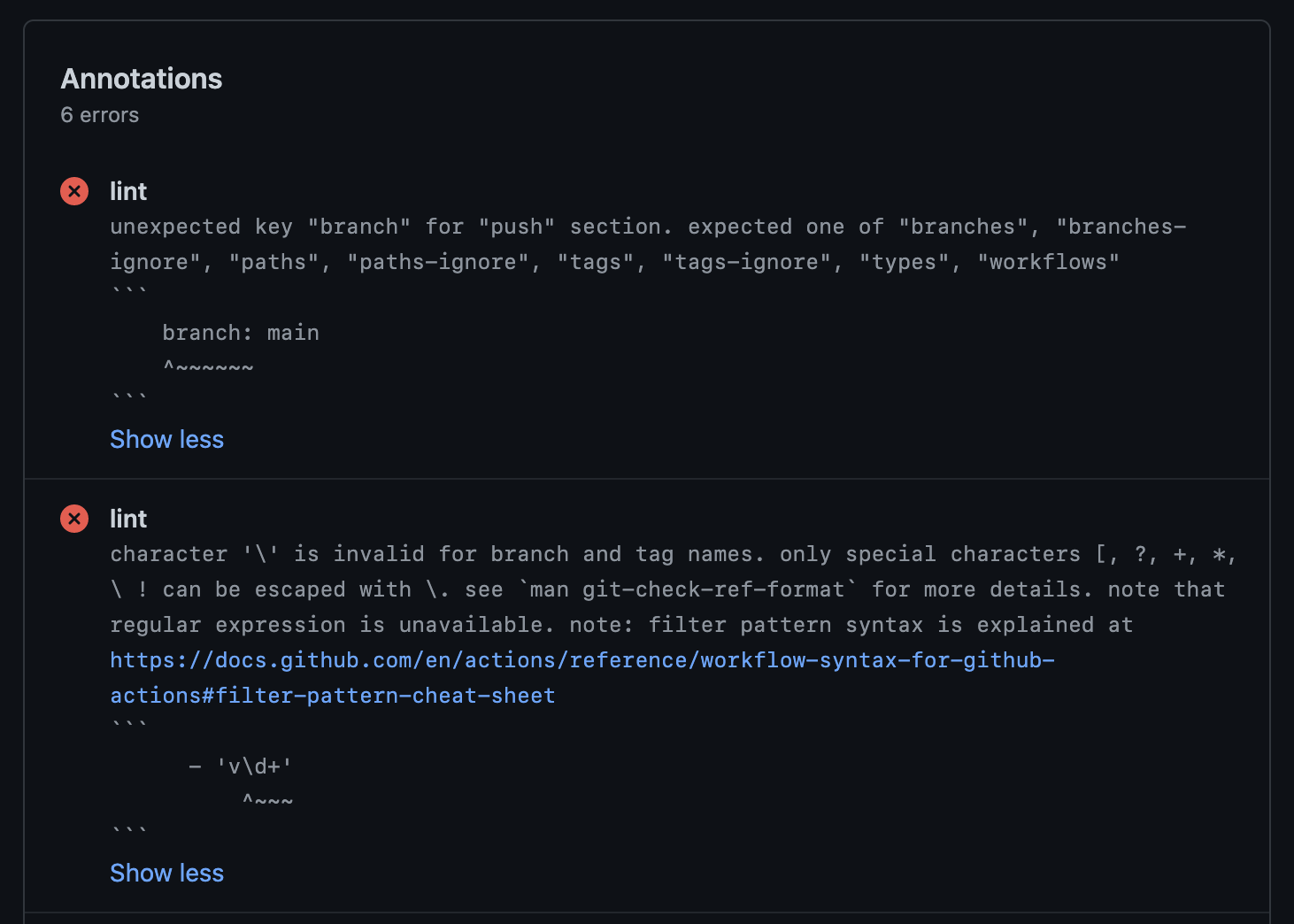
To include newlines in the annotation body, it prints %0A. (ref actions/toolkit#193). And it suppresses SC2016 shellcheck rule error since it complains about the template argument.
Basically it is more recommended to use Problem Matchers or reviewdog as explained in 'Tools integration' section below.
Example: SARIF format
The Static Analysis Results Interchange Format (SARIF) is a standardized format for the results of static analysis tools. jactionlint --format sarif prints a SARIF 2.1.0 log. Each result has the rule ID (ruleId), the level (error, warning or note), the region of the error (startLine, startColumn, endLine and endColumn; columnKind is unicodeCodePoints) and, for the rules which have an automatic fix, fixes with artifactChanges[].replacements[] (deletedRegion and insertedContent.text). The rules of the driver describe the rules which appear in the results with their summary, group and a link to the documentation. A result which the rule could fix but has no fix carries the reason in its properties (noFixCode, noFixReason and noFixOption), so that code scanning consumers can tell it from advice-only findings.
A custom template still works. This is the template file in test data which was used before --format sarif. The output example in test data is its output.
Formatting syntax
In Go template syntax, . within {{ }} means the target object. Here, the target object is a sequence of error objects.
The sequence can be traversed with range action, which is like for ... = range ... {} in Go.
{{range $err := .}} this part iterates error objects with the iteration variable $err {{end}}The error object has the following fields.
| Field | Description | Example |
|---|---|---|
{{$err.Message}} | Body of error message | property "platform" is not defined in object type {os: string} |
{{$err.Snippet}} | Code snippet to indicate error position | node_version: 16.x\n ^~~~~~~~~~~~~ |
{{$err.Kind}} | Name of rule the error belongs to (legacy) | expression |
{{$err.ID}} | Stable ID of the rule such as unpinned-uses | template-injection |
{{$err.Severity}} | Level of the error: error, warn or info | error |
{{$err.DocURL}} | URL of the documentation of the rule | https://jactionlint.jdx.dev/rules#template-injection |
{{$err.Filepath}} | Canonical relative file path of the error position | .github/workflows/ci.yaml |
{{$err.Line}} | Line number of the error position (1-based) | 9 |
{{$err.Column}} | Column number of the error's start position (1-based) | 11 |
{{$err.EndLine}} | Line number of the error's end position (1-based) | 9 |
{{$err.EndColumn}} | Column number of the error's end position (1-based) | 23 |
Functions called in {{ }} placeholder are template actions. There are many actions defined by Go standard library. In addition, there are a few custom actions defined by jactionlint. Most useful action would be json as we already used it in the above JSON example. List of all custom actions are as follows:
| Action | Description | Example usage |
|---|---|---|
json x | Serialize x as JSON string followed by newline character | {{json $err}} |
replace x y z | Replace string y with z in x | {{replace $err.Filepath "\\" "/"}} |
toPascalCase x | Convert x into PascalCase (e.g. 'foo-bar' to 'FooBar') | {{toPascalCase $err.Kind}} |
allRules | Return an array of rule objects (all rules with their IDs). Explained below | {{range $ = allRules}}{{$.ID}}{{end}} |
allKinds | Return an array of kind objects. The kind object is explained in the below table | {{range $ = allKinds}}{{$.Name}}{{end}} |
getVersion | Return the version of jactionlint as string | {{getVersion}} |
The kind object returned from allKinds action has the following fields.
| Field | Description | Example |
|---|---|---|
{{$kind.Name}} | Name of the kind | syntax-check |
{{$kind.Description}} | Short description of the kind | Checks for GitHub Actions workflow syntax |
The rule object returned from allRules action has the following fields: ID, Name (the ID in PascalCase), Description, Group (correctness, security, policy or style), DefaultLevel, Profile and URL.
For example, the following simple iteration body
line is {{$err.Line}}, col is {{$err.Column}}, message is {{$err.Message | printf "%q"}}will produce output like below.
line is 21, col is 20, message is "property \"platform\" is not defined in object type {os: string}"In {{ }} placeholder, input can be piped and action can be used to transform texts. In above example, the message is piped with | and transformed with printf "%q".
Note that special characters escaped with backslash like \n in the format string are automatically unescaped.
Exit status
jactionlint command exits with one of the following exit statuses.
| Status | Description |
|---|---|
0 | The command ran successfully and no problem was found |
1 | The command ran successfully and some problem was found |
2 | The command failed due to invalid command line option or flag value (--profile, --format, --ignore, ...) |
3 | The command failed due to some fatal error (no project, an unreadable file or config) |
With a baseline the findings it accepts do not count.
Only the errors whose level is error count as problems. Every rule is an error unless the configuration lowers it, so the exit status is 1 whenever something is reported by default. The findings of warn and info level are printed but the exit status stays 0 unless --strict-exit is given. --min-severity warn (or error) hides the findings below the level.
jactionlint --strict-exit                # warnings and infos fail, too
jactionlint --min-severity error         # show only errors
Adopt a stricter configuration with a baseline
The default profile has the security posture and policy rules, so the first run on a repository with many workflows can report hundreds of findings. A baseline lets you adopt the checks without fixing everything first: it records today's findings, hides them, and fails the build only on findings that are new. Then you pay the debt down at your own pace.
See what you are facing.
--format summaryprints counts per rule and per file instead of the findings:shjactionlint --format summary113 findings in 24 of 31 files by rule findings missing-timeout 61 template-injection 23 ...Write the baseline.
shjactionlint --baseline-writeThis lints the whole repository (like running without arguments) and writes
.github/jactionlint-baseline.json. It exits with0. Use--baseline-write=FILEfor another path. Write it in the environment your CI runs in: the same configuration,--onlineif CI uses it, and the sameshellcheckandpyflakes. A finding that your machine cannot produce (noshellcheck, no--online) is not recorded, so CI would report it as new.Commit it and apply it. The baseline is only used when you ask for it, with the flag or with the configuration:
shjactionlint --baseline # hides the findings of the baselineyaml# .github/jactionlint.yaml baseline: auto # use .github/jactionlint-baseline.json when the file existsbaselinetakesauto(ortrue),false, or the path of the file relative to the repository root (the file must exist then). On the command line--baselineuses the default file,--baseline=FILEanother one and--no-baselineignores a baseline that the configuration enables. With the baseline applied the exit status depends only on the findings that are not in it, so the build fails on new findings and nothing else. The text formats print a note on stderr with the number of hidden findings.Ratchet down. Fix findings (
jactionlint --fixalso fixes the baselined ones), then shrink the file:shjactionlint --baseline-write # drops the entries of fixed findings--baseline-checklists the entries which match nothing any more asunused-baseline-entryfindings located in the baseline file. They areinfo, so they are only shown. To make the build fail until the file is shrunk, set the level in the configuration:yamlrules: unused-baseline-entry: errorand run
jactionlint --baseline-checkin CI. A baseline can only get smaller this way: a fixed finding leaves an unused entry, a new finding is reported, and the one thing that cannot happen is a silent regression.
How an entry matches a finding, so that you know what an edit does to the baseline:
- An entry is the file, the rule ID, a fingerprint and an occurrence index, not a line number. Adding a step, moving a job or reformatting does not resurrect baselined findings, and
--baseline-writeafter an unrelated edit gives the same file byte for byte (CRLF and LF checkouts are the same, too). - The fingerprint is a hash of the rule, the enclosing job (or top-level key), the whitespace-normalized source line of the finding and the normalized message. Editing the line of a finding makes it new again, which is the point: the changed code is reviewed. Changing the name of a job does the same for its findings.
- Identical findings in one job (the same line twice) are told apart by their order. The baseline accepts as many as it recorded; a third one is new, and fixing one leaves one unused entry.
- A finding that only changed because a release rewords the message of its rule still matches (the file also stores a hash without the message), so upgrading does not resurrect anything. Rewriting the baseline refreshes the messages.
- A baseline is portable: the same file works in a checkout at another path (a CI runner, a colleague's machine). The messages that mention a local action show its path relative to the repository (
./.github/actions/setup), and the path of the checkout is replaced in the fingerprint of any message that still contains it. A finding about a local action (itsaction.ymlis broken, a file it names is missing) is reported once, at its first use in the order of the files, however many workflows use the action. - A renamed file loses its entries: they are keyed by the path relative to the repository root. The findings of the new path are reported and the old entries are unused. Run
jactionlint --baseline-writeafter the rename (it follows the rename and is the only step needed). --baseline-write file1.yaml file2.yamlrefreshes only the entries of those files and keeps the entries of the other files that still exist; it is what a pre-commit hook can run for the changed files.- The baseline records the findings after
--ignore, theignoreconfiguration, inline ignore comments, rules that areoffand--min-severity, so change these first and write the baseline last. It never recordsunused-baseline-entry. - Entries of rules that this run cannot reproduce (an
--onlinerule without--online,shellcheckorpyflakesthat is not installed, a rule that isoff) are not reported as unused, because nothing says they are fixed. --format sarifkeeps the baselined findings in the log as results with asuppressionsentry of kindexternal, which GitHub code scanning shows as closed.--sarif-hide-baselinedleaves them out, for tools like hk that do not read suppressions.--format summarycounts them as baselined. The other formats do not print them.
--baseline and --baseline-write do not take the file as a separate argument: write --baseline=FILE, because a following argument is a workflow file to check.
Fix errors automatically
--fix applies the automatic fixes of the errors which have one, rewrites the files and reports the errors which remain. It repeats until nothing changes so running it twice makes no further change, and it exits with 1 when an error remains. Only the fixes which do not change the behavior of the workflow are applied; --fix=unsafe applies all of them.
jactionlint --fix
jactionlint --fix .github/workflows/ci.yaml
jactionlint --fix --fix-rules missing-timeout,artipacked   # only the fixes of these rules
jactionlint --diff                                    # show the changes as a unified diff, write nothing
When it is done --fix says what it changed, per rule, on stderr:
Fixed 12 problem(s) in 3 file(s)
  missing-timeout: 8
  artipacked: 4
--fix-rules <id>[,<id>...]restricts--fix(and--diff) to the fixes of the listed rules; the other findings are still reported. The same list can be set withfix.rulesin the configuration file. An unknown ID is an error.--diffcomputes the fixes like--fix(safe ones, or--diff --fix=unsafe) but writes nothing. The unified diff is on stdout, sojactionlint --diff | patch -p1applies it, and the remaining errors are on stderr. The exit status is1when there is a diff or an error remains.- Several fixes in one run. Fixing happens in memory and the file is written once, atomically (a temporary file in the same directory is renamed over it), with its permission bits, its line breaks (CRLF stays CRLF) and a symbolic link kept. A file that changed on disk while it was being fixed is not overwritten.
How fixing converges and what it checks
Each pass lints the text, chooses fixes that do not overlap, applies them and lints the result again, until no fix is left.
- Overlapping fixes. When the edits of two fixes overlap, exactly one is applied in the pass and the other is dropped for the pass; its finding is reported again in the next pass against the new text, or is gone. The winner does not depend on the order of the findings: safe fixes come before unsafe ones, then rules in this order (
template-injection,insecure-commands,artipacked,bot-conditions,unpinned-uses,self-repository,obfuscation,missing-permissions,missing-timeout,anonymous-definition, any other rule,unused-ignore), then by position. Fixes that remove a security problem from the code come first, and the removal of an unused ignore comment last. - Every pass is checked. The result of a pass must be valid YAML, and the parsed document must equal the document before it except where the edits are: a key or item that appears, disappears or changes away from every edit, or a value that changes its type (
'true'becomingtrue), makes the pass fail. Comments, the order of keys and the quoting style do not count. The fixes are then tried one by one: the one that breaks the file is refused, the rest are applied, and the run exits with status3after printing which rule it was (error: .github/workflows/ci.yaml: the fix at line 12 would damage the file: ... (rules: template-injection)). That rule is not fixed again in that file. This is a guard against bugs in fixers, not a proof: it cannot tell that an edit put a wrong value in the right place, a difference next to an edit is accepted, anchors are compared only by the aliases that use them, and line breaks other than LF, CRLF and CR make the positions approximate. - No endless loops. If the text of a pass comes back (two rules undo each other) or fixes remain after 10 passes, the file is not written with them: it stays as it was before the fixes that kept repeating, and the run exits with status
3naming the rules. - Text is escaped for where it goes. A fix that inserts text into a scalar escapes it for how the scalar is written: a backslash or quote in a double quoted scalar, a quote in a single quoted one, indentation in a block scalar, and an environment variable value that is not a plain-safe string is quoted. A fix that cannot represent its text in the place offers no fix.
Only the rules that can fix their findings mechanically have a fix; the errors of the other rules are only reported. --fix cannot be used with stdin. These rules have a fix:
| Rule | What --fix does | Safe |
|---|---|---|
anonymous-definition | Adds a name: to the workflow and to jobs. | Yes |
artipacked | Sets persist-credentials: false on actions/checkout. | Unless a later step pushes or needs the credentials |
bot-conditions | Checks the author of the pull request (github.event.pull_request.user.login) instead of the actor, for workflows that only run on pull request events. | No |
concurrency-cancels-release | Sets a literal cancel-in-progress: true to false. | No |
concurrency-limits | Adds a group per pull request with cancel-in-progress: true, only for workflows that only pull requests start and that release nothing. | Yes |
dependabot-cooldown | Adds or raises cooldown.default-days, only when default-days sets the number. | Yes |
dependabot-execution | Sets insecure-external-code-execution: deny. | No |
insecure-commands | Removes the ACTIONS_ALLOW_UNSECURE_COMMANDS variable. | No |
invisible-characters | Removes the invisible characters. | Yes |
missing-permissions | Adds permissions: with contents: read to the workflow after the on: block, but not to a reusable (workflow_call) workflow. | Only when nothing shows that a job needs the token, else unsafe |
missing-timeout | Adds timeout-minutes: N to the job after runs-on:, only when default-minutes sets N. | Yes |
mutable-runner-label | Writes the fixed label of the pin option in place of a moving one. | Yes |
obfuscation | Writes the path of uses: in its plain form. | No |
pipeline-without-pipefail | Adds set -o pipefail as the first line of a run: | script. | No |
self-repository | Writes $/ for ./ in uses:; needs runner 2.336.0 or newer, and actionlint 1.7.12 and older reject it. | No |
template-injection | Moves a simple ${{ }} reference of a bash or sh script into env:, but not one in a word list such as for f in ${{ }}. | For plain references; the others are unsafe |
unlocked-install | Adds --locked to cargo install. | No |
unpinned-uses | With --online, replaces a tag with its commit and names the tag in a comment (see below). | Yes |
unused-ignore | Removes the ignore comment, or only its patterns which did nothing when the comment has others. | Yes |
Two of these fixes write a number which jactionlint does not choose, so they are off until you set it in .github/jactionlint.yaml:
rules:
  missing-timeout:
    default-minutes: 15   # --fix adds timeout-minutes: 15 to jobs without one
  dependabot-cooldown:
    default-days: 7       # --fix adds cooldown.default-days: 7 to Dependabot updates
The findings of missing-timeout and dependabot-cooldown say so while the option is not set.
A finding in a shape the fix does not understand (a job written as job: {runs-on: ...}, a job with a YAML anchor, a file with a bare carriage return) is reported without a fix. The section of each rule in the checks document says when its fix applies and why an unsafe one is unsafe.
Online checks
Six checks need to ask GitHub about the actions a workflow uses, so they are off unless you give --online (or set online: true in the configuration, or JACTIONLINT_ONLINE=1 in the environment). Without it jactionlint never uses the network.
To use them in CI only, leave the command as it is and set the environment variable in the CI job (a pre-commit hook on a laptop does not have it): JACTIONLINT_ONLINE=1 is the same as --online, JACTIONLINT_ONLINE=cache, strict and cache,strict are the modes of --online=MODE, and JACTIONLINT_ONLINE=0 (or false, off, no) is the same as --no-online. An empty variable is not set. The command line wins over the variable (--online, --no-online), and the variable wins over online: of the configuration file. An invalid value is an error (exit status 2). In GitHub Actions the job also has to hand the token to the step, since the runner does not export it by itself:
- run: hk check --all
  env:
    JACTIONLINT_ONLINE: 1
GITHUB_TOKEN: ${{ github.token }}| Rule | What it finds |
|---|---|
impostor-commit | A hash-pinned action whose commit is on no branch or tag of the repository: it comes from a fork |
known-vulnerable-actions | An action version covered by a GitHub security advisory |
ref-confusion | A ref which is both a branch and a tag |
stale-action-refs | A pinned commit that no tag points to |
archived-uses | An action in an archived repository |
ref-version-mismatch | A # v1.2.3 comment that does not match the pinned commit |
export GITHUB_TOKEN=$(gh auth token)   # or GH_TOKEN
jactionlint --online- A failed lookup does not fail the run. When GitHub answers 404 (a private action, or one that does not exist), 403, a server error, or does not answer in time, or the DNS lookup fails, that lookup is skipped and the other actions are checked as usual. jactionlint prints one warning per kind of failure (on stderr, or in the SARIF notifications with
--format sarif) and the exit status does not change.--verboselists every skipped lookup.--online=strictturns a skipped lookup into exit status 3, for a pipeline where a check that could not run must not pass silently. - Coverage in SARIF. With
--format sarifand the online checks on, the run hasproperties.onlineCoverage:status(complete, orincompletewhenskippedLookupsis not zero),mode,skippedLookups,excludedRepositories(left out on purpose byallow/deny) andevidence(networkorcache). The property is absent when the online checks were off, so "not checked" is distinguishable from "checked, nothing found". It is evidence about the run, not a trust guarantee: a resolved ref or a timestamp does not prove that a tag was never repointed. - Token. The first of these is used: the variable named by
--online-token-env, the file named by--online-token-file,GITHUB_TOKEN,GH_TOKEN(for a GitHub Enterprise ServerGITHUB_ENTERPRISE_TOKENandGH_ENTERPRISE_TOKENcome first), and finally the output ofgh auth token --hostname HOSTwhenghis installed (setgh-cli: falseinonline-optionsto never run it). Without a token the requests are unauthenticated, which works but GitHub allows only 60 an hour; jactionlint says so once.--verbosesays which source supplied the token, never the token. A token that GitHub rejects (401) is dropped with a warning and the run goes on without it; one that cannot read a repository (403) is tried again without it for that repository. - The token never leaves the API host. It is sent to the host of the API only, over https (plain http only to localhost), and a redirect to another host is refused. It is replaced by
[redacted]in--debugoutput, warnings and errors, even when a server echoes it. A host named by theonline-optionsof a repository's.github/jactionlint.yamlgets no token, because a pull request could otherwise send your token to any server: name the host with--online-api-url,GITHUB_API_URL, your own--config-fileor your user-global config. - GitHub Enterprise Server. The API is
--online-api-url, else$GITHUB_API_URL(set by GitHub Actions), else derived from$GITHUB_SERVER_URLor$GH_HOST(https://HOST/api/v3, orhttps://api.NAME.ghe.comfor data residency), elseapi.github.com. Answers are cached per host. - Rate limits.
X-RateLimit-*andRetry-Afterare read. A limit which resets within 30 seconds (--online-max-wait) is waited for; one which resets later skips the remaining lookups with a message naming the reset time, and answers in the cache are still used. Server errors (500, 502, 503, 504), a secondary rate limit and a request which timed out once are repeated with exponential backoff and jitter, at most twice (retries). - Skip private or internal actions.
--online-deny 'mycorp/*'(repeatable, ordeny:inonline-options) never asks about matching repositories,--online-allow 'actions/*'asks only about matching ones. They are not failures and not warned about. - Cache. Answers are kept in
$XDG_CACHE_HOME/jactionlint(~/.cache/jactionlint), at most 32 MiB, shared safely by parallel processes, keyed by API host and token. An answer is used for an hour (--online-cache-ttl,cache-ttl), then asked for again with its ETag, which costs no rate limit when it did not change.--online-cache-ttl=0checks every answer. A public answer fetched without a token also serves a run with one. An answer fetched with a token is stored for that token, and also for every other token (so theGITHUB_TOKENof a CI job, which changes every run, does not empty a restored cache) when the repository is known to be public: its repository endpoint said"private": false, which jactionlint asks once per repository if it has not been asked yet. For a private or internal repository, or when that is not known, the answer is only ever served to the token that fetched it. An answer that says "not found" is never shared. - Offline.
--online=cachenever uses the network: it answers from the cache whatever the age of the answers, and a lookup with nothing cached is skipped with one warning (run once with--onlineto fill the cache).--online=cache,strictfails on such a lookup. Good for a laptop on a plane or a sandboxed CI job that restores the cache directory. - Few requests. Every repository, tag and commit is asked for once per run however often it is used, and the checks share what they learn. At most six requests are in flight (
concurrency). The number of requests grows with the number of different actions, not steps. Interrupting with Ctrl-C stops the lookups. - Levels. The online rules do not belong to a profile;
--onlineturns them on at their own level (impostor-commitandknown-vulnerable-actionsare errors,ref-confusion,archived-usesandref-version-mismatchwarnings,stale-action-refsis informational). Set a level oroffinrulesas for any rule. - Not in the playground. The WebAssembly build has no network access, so
--onlineis an error there.
Pin tags to commits with --online --fix
With the online checks, --fix can repair unpinned-uses findings (a rule of the default profile) by replacing a tag with the commit it points to and naming the tag in a comment, the format Dependabot and Renovate keep up to date:
- uses: actions/checkout@v4
# becomes
- uses: actions/checkout@11d5960a326750d5838078e36cf38b85af677262 # v4
The fix is applied by plain --fix because it keeps the code the same: it is offered only when the ref is the name of a tag (annotated tags are followed to the commit) and no branch has the same name. A branch, an unknown tag, an abbreviated SHA, a Docker image or a line with a comment that does not name the ref is left to you.
jactionlint --online --fixhk
hk runs linters and fixers as Git hooks and from the command line. jactionlint --format sarif gives hk the diagnostics with the rule IDs. hk util sarif-diff turns the fixes in the SARIF log into a patch, and jactionlint --fix is the fixer hk runs when a finding has no fix. Add this step to hk.pkl:
["jactionlint"] {
    glob = List(".github/workflows/*.yml", ".github/workflows/*.yaml")
    batch = true
    diagnostic_format = "sarif"
    check = "jactionlint --format sarif {{files}}"
    check_diff = "hk util sarif-diff -- jactionlint --format sarif {{files}}"
    fix = "jactionlint --fix {{files}}"
}
Only the fixes which are safe, valid and do not conflict with each other are in the SARIF log. A finding which cannot be fixed stays without a fix so hk runs
jactionlint --fixand still reports it.The log uses
columnKind: unicodeCodePointsand file URIs relative to the directory where jactionlint ran.The exit status is
0for a clean run and1when errors were found. Other statuses are failures. Nothing but the SARIF log is on stdout, and nothing is on stderr unless--verboseor--debugis given, because hk parses both together. The deprecation warnings of the configuration are put ininvocations[].toolConfigurationNotificationsof the log instead of stderr in this format.To adopt the checks gradually, record a baseline and apply it in the commands. hk parses the SARIF log and does not know suppressions, so leave the baselined findings out of it:
pklcheck = "jactionlint --baseline --sarif-hide-baselined --format sarif {{files}}" check_diff = "hk util sarif-diff -- jactionlint --baseline --sarif-hide-baselined --format sarif {{files}}"or set
baseline: autoin the configuration and pass only--sarif-hide-baselined. Refresh the file withjactionlint --baseline-write(not through hk) when you pay findings down.To follow another profile, set
profile: correctnessorprofile: pedanticin.github/jactionlint.yaml, or pass--profile NAMEin the hk command.correctnessis what actionlint checks; see coming from actionlint.missing-timeoutis in the default profile, so the firsthk checkon a repository whose jobs have notimeout-minutesfails on every job. Its fix exists only whenrules.missing-timeout.default-minutesis set (there is no built-in number). The fix is safe and is in the SARIF log, sohk fixadds the timeout without runningjactionlint --fix.missing-permissions(default) is only in the log when the fix is safe; otherwise hk runsjactionlint --fix, which leaves the unsafe fix alone and still reports the finding, and you decide whether to runjactionlint --fix=unsafe.To add the online checks put the flag in the commands. A second step keeps them apart from the offline checks, so you can run it on demand or in CI, where a token is at hand:
pkl["jactionlint-online"] { glob = List(".github/workflows/*.yml", ".github/workflows/*.yaml") batch = true diagnostic_format = "sarif" check = "jactionlint --online --format sarif {{files}}" check_diff = "hk util sarif-diff -- jactionlint --online --format sarif {{files}}" fix = "jactionlint --online --fix {{files}}" }The batches run in parallel and share the cache. Without a reachable GitHub the step prints one warning in the SARIF log and reports what it could check. Keep the online step out of the
pre-commithook unless a token is always set.
Use jactionlint on GitHub Actions
The action
jdx/jactionlint downloads jactionlint, runs it and annotates the changed files with the findings. The job fails when jactionlint reports an error:
name: Lint GitHub Actions workflows
on:
  push:
    branches: [main]
  pull_request:
permissions: {}
jobs:
  jactionlint:
    runs-on: ubuntu-latest
    timeout-minutes: 10
    permissions:
      contents: read
    steps:
      - uses: actions/checkout@d23441a48e516b6c34aea4fa41551a30e30af803 # v6.1.0
        with:
          persist-credentials: false
      - uses: jdx/jactionlint@v2.1.0
Pin the action to a commit hash, like any other, if you want it immutable. These inputs are available:
| Input | Default | Description |
|---|---|---|
version | the release of the action | An exact X.Y.Z version of jactionlint. Every release bumps the default, so jdx/jactionlint@v2.1.0 installs jactionlint 2.1.0 (the example above shows the current release) |
executable | The path of a jactionlint executable to use instead of downloading one, for example one installed by mise | |
files | Files to check, separated by whitespace. Without it the nearest .github/workflows is checked | |
profile | correctness, default or pedantic. Without it the profile of the config file applies | |
config-file | The config file, when it is not .github/jactionlint.yaml | |
min-severity | Hide findings less severe than info, warn or error | |
strict-exit | false | Fail for findings of level warn and info too |
online | true runs the online checks with token, false never uses the network, cache and strict are the modes of --online. Empty leaves it to the config file | |
token | ${{ github.token }} | The GitHub API token of the online checks. It is not passed to jactionlint when online is false |
annotations | true | Annotate the files in the pull request (--format github) |
advanced-security | false | Upload the findings to code scanning as SARIF instead. The job needs security-events: write. It takes precedence over annotations |
color | true | Colorize the text output (when annotations is false) |
args | More command line options, separated by whitespace | |
working-directory | . | The directory to run jactionlint in |
The executable output is the path of the executable the action used. With advanced-security, sarif-file is the path of the SARIF file. The findings are uploaded even when there are some, and the job fails afterwards.
mise
The recommended way to install jactionlint in CI is mise with jdx/mise-action. mise use jactionlint records the version in the mise.toml of the project, so CI runs the version developers run; mise lock also records its checksum in mise.lock, which you commit. The workflow below passes the default profile itself:
name: Lint GitHub Actions workflows
on:
  push:
    branches: [main]
  pull_request:
permissions: {}
concurrency:
  group: ${{ github.workflow }}-${{ github.event.pull_request.number || github.ref }}
  cancel-in-progress: true
jobs:
  jactionlint:
    runs-on: ubuntu-latest
    timeout-minutes: 10
    permissions:
      contents: read
    steps:
      - uses: actions/checkout@3d3c42e5aac5ba805825da76410c181273ba90b1 # v7.0.1
        with:
          persist-credentials: false
      - uses: jdx/mise-action@c2a87611a18de5b3828c5652fe268e992400cb5c # v4.3.0
      - run: jactionlint --color
Add --format github to annotate the changed files with the findings, or --format sarif to upload them to code scanning.
Preparing the jactionlint executable with the download script is another option. See the instruction for more details. It sets an absolute file path of downloaded executable to executable output in order to use the executable in the following steps easily. Please ensure shell: bash since the default shell for Windows runners is pwsh. jactionlint's own unverified-download rule reports a script piped or sourced into a shell, so the step below accepts it with an ignore comment; prefer a pinned release and its checksum when you can:
- name: Download jactionlint
  id: get_jactionlint
  # jactionlint ignore=unverified-download
  run: bash <(curl https://raw.githubusercontent.com/jdx/jactionlint/main/scripts/download-jactionlint.bash)
  shell: bash
- name: Check workflow files
  run: ${{ steps.get_jactionlint.outputs.executable }} --color
  shell: bash
The download script allows to specify the version of jactionlint and the download directory. Try to give --help argument to the script for more usage details.
If you want to enable shellcheck integration, install shellcheck command. Note that shellcheck is pre-installed on Ubuntu worker.
If you want to annotate errors from jactionlint on GitHub, consider using --format github or Problem Matchers.
If you prefer Docker image to running a downloaded executable, using jactionlint Docker image is another option:
- name: Check workflow files
  uses: docker://ghcr.io/jdx/jactionlint:latest
  with:
    args: --color
The default profile asks for a pinned image here too (unpinned-uses): use the digest of the image you tested.
Online playground
Thanks to WebAssembly, jactionlint playground is available on your browser. It never sends any data to outside your browser.
Paste your workflow content to the code editor at left pane. It automatically shows the results at right pane. When editing the workflow content in the code editor, the results will be updated on the fly. Clicking an error message in the results table moves a cursor to position of the error in the code editor.
Docker image
Official Docker image is available. The image contains jactionlint executable and all dependencies (shellcheck and pyflakes).
Available tags are:
jactionlint:latest: Latest stable version of jactionlint. This image is recommended.jactionlint:{version}: Specific version of jactionlint. (e.g.jactionlint:2.1.0)
Just run the image with docker run:
docker run --rm ghcr.io/jdx/jactionlint:latest --versionTo check all workflows in your repository, mount your repository's root directory as a volume and run jactionlint in the mounted directory. When you are at a root directory of your repository:
docker run --rm -v $(pwd):/repo --workdir /repo ghcr.io/jdx/jactionlint:latest --colorTo check a file with jactionlint in a Docker container, pass the file content via stdin and use - argument:
cat /path/to/workflow.yml | docker run --rm -i ghcr.io/jdx/jactionlint:latest --color -Or mount the workflows directory and pass the paths as arguments:
docker run --rm -v /path/to/workflows:/workflows ghcr.io/jdx/jactionlint:latest --color /workflows/ci.ymlUsing jactionlint from Go program
Go APIs are available. See the Go API document for more details.
Tools integration
reviewdog
reviewdog is an automated review tool for various code hosting services. It officially supports actionlint. You can check errors from jactionlint easily with inline review comments at pull request review.
The usage is easy. Run reviewdog/action-actionlint action in your workflow as follows.
name: reviewdog
on: [pull_request]
jobs:
  jactionlint:
    runs-on: ubuntu-latest
    steps:
      - uses: actions/checkout@v6
      - uses: reviewdog/action-actionlint@v1
Problem Matchers
Problem Matchers is a feature to extract GitHub Actions annotations from terminal outputs of linters.
Copy jactionlint-matcher.json to .github/jactionlint-matcher.json in your repository.
Then enable the matcher using add-matcher command before running jactionlint in the step of your workflow.
- name: Check workflow files
  run: |
    echo "::add-matcher::.github/jactionlint-matcher.json"
    bash <(curl https://raw.githubusercontent.com/jdx/jactionlint/main/scripts/download-jactionlint.bash)
    ./jactionlint --color
  shell: bash
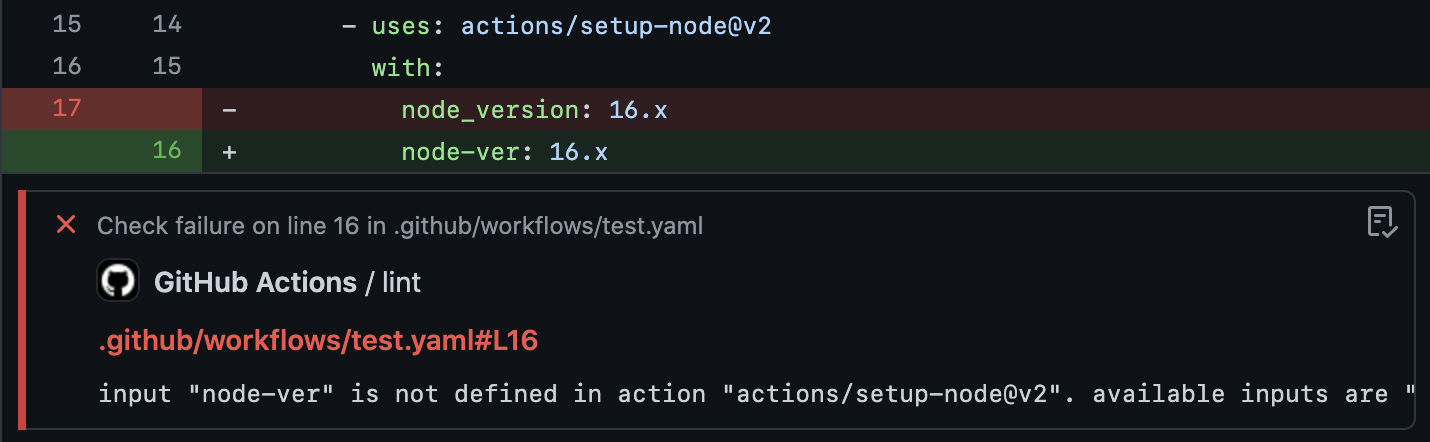
When you change your workflow and the changed line causes a new error, CI will annotate the diff with the extracted error message.
super-linter
super-linter is a Bash script for a simple combination of various linters, provided by GitHub. It has support for jactionlint. Running super-linter in your repository automatically runs jactionlint.
To ignore some errors, please add --ignore option by using GITHUB_ACTIONS_COMMAND_ARGS environment variable. Please see super-linter/super-linter#1852 for the discussion.
MegaLinter
MegaLinter is a linters aggregator for CI, embedding linters for many languages and formats. It has support for jactionlint out of the box. Running MegaLinter in your repository automatically runs jactionlint on your workflow files. Please see the jactionlint page of MegaLinter documentation for more details.
pre-commit
pre-commit is a framework for managing and maintaining multi-language Git pre-commit hooks. jactionlint is available as a pre-commit hook to check workflow files in .github/workflows/ directory.
Add this to your .pre-commit-config.yaml in your repository:
---
repos:
  - repo: https://github.com/jdx/jactionlint
    rev: v2.1.0  # x-release-please-version
    hooks:
      - id: jactionlint
As alternatives to jactionlint hook, jactionlint-docker or jactionlint-system hooks are available.
| Hook ID | Explanation |
|---|---|
jactionlint | Automatically installs jactionlint command in isolated $GOPATH directory using Go toolchain. |
jactionlint-docker | Automatically pulls the jactionlint Docker image. |
jactionlint-system | Uses system-installed jactionlint command. The command is necessary to be installed manually. |
VS Code
Linter extension for VS Code is available. The extension automatically detects .github/workflows directory, runs jactionlint command, and reports errors in the code editor while editing workflow files.
Emacs
Plugins for both Flycheck and Flymake are available via MELPA.
Their respective repositories are flycheck-actionlint and flymake-actionlint.
Vim and Neovim
nvim-lint supports jactionlint on Neovim. The plugin automatically and asynchronously runs jactionlint and notifies errors on the fly when you edit GitHub Actions CI workflows. Please read the plugin's documentation for more details.
ALE supports jactionlint on Vim and Neovim. Similar to nvim-lint, The plugin automatically and asynchronously runs jactionlint and notifies errors on the fly when you edit GitHub Actions CI workflows. Please read the plugin's documentation for more details.
Pulsar Edit
A Linter package for Pulsar Edit is available. The package automatically detects a workflows directory, executes the jactionlint command on any detected GitHub Actions files within the directory, and reports returned information in the code editor display tab while editing workflow files.
Nova
Nova.app is a MacOS only editor and IDE. The Actionlint for Nova allows you to get inline feedback while editing actions.
trunk
trunk is an extendable superlinter with a builtin language server and preexisting issue detection. Actionlint is integrated here.
Once you have initialized trunk in your repo, to enable at the latest actionlint version, just run:
trunk check enable actionlintor if you'd like a specific version:
trunk check enable actionlint@1.7.12or modify .trunk/trunk.yaml in your repository to contain:
lint:
  enabled:
    - jactionlint@1.7.12
Then just run:
trunk checkand it will check your modified files via actionlint, if applicable, and show you the results. Trunk also will detect preexisting issues and highlight only the newly added actionlint issues. For more information, check the trunk docs.
You can also see actionlint issues inline in VS Code via the Trunk VS Code extension.
Checks | Installation | Configuration | Go API | References